Authorizing a Salesforce org in VS Code is usually straightforward: open the Command Palette, select SFDX: Authorize an Org, pick Production or Sandbox, log in through the browser, done. But with a Salesforce on Alibaba Cloud (SFoA) org, that workflow breaks. The login domain is different, the built-in Connected App does not work, and on Mac there is a DNS check issue that hangs the entire flow. Setting it up from scratch takes about 15 minutes, but without knowing what to change, it can eat an entire day.
Where SFoA differs from the global version
The global Salesforce VS Code extension ships with a built-in Connected App. When you authorize via CLI, it uses that app's client_id for OAuth—you never have to deal with Consumer Keys. On SFoA, this built-in app does not work. Its client_id is registered on the global authentication server, and SFoA's authentication endpoint is entirely separate—it simply does not recognize that id.
| Global | SFoA | |
|---|---|---|
| Login URL | login.salesforce.com |
login.sfcrmproducts.cn |
| My Domain | *.my.salesforce.com |
*.my.sfcrmproducts.cn |
| Setup pages | *.lightning.force.com |
*.setup.sfcrmproducts.cn |
| CLI authorization | Built-in Connected App, works out of the box | Must create External Client App manually |
| Command Palette auth | Works normally | Does not work (built-in client_id invalid) |
| PKCE | Recommended to enable | Must be disabled |
The key steps to connect to an SFoA org: create an External Client App in the org to get a Consumer Key, then authorize via the terminal using sf org login web --client-id with that key.
Step 1: Create an External Client App in the SFoA org
Log into your SFoA org and go to Setup.
- Search for
External Client App Managerin Quick Find - Click New External Client App
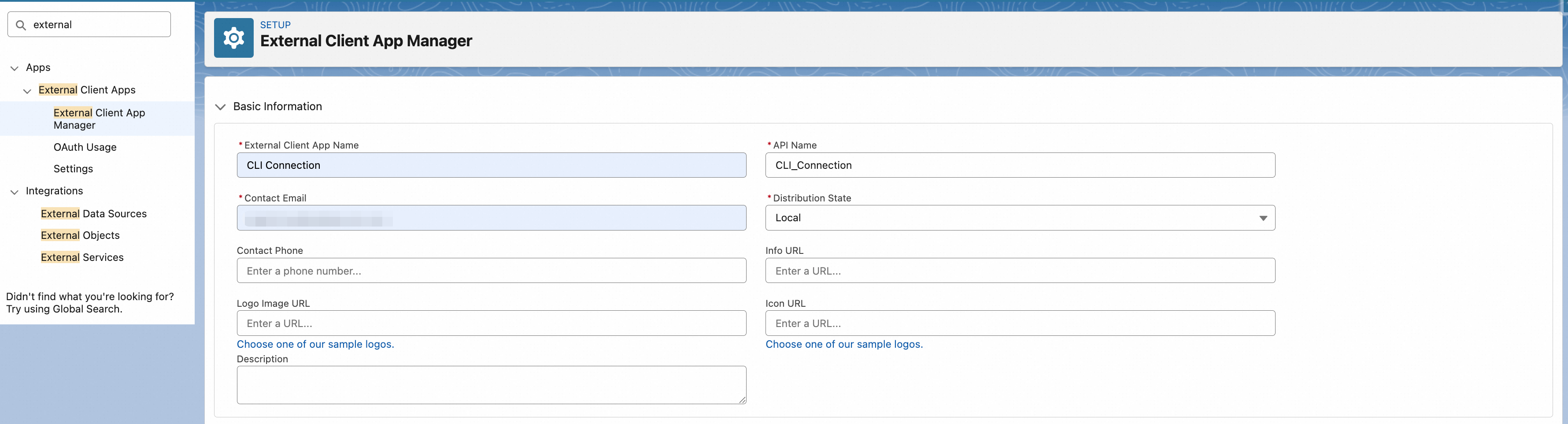
- Enter an app name (e.g.
CLI Connection) and a contact email. The API Name auto-generates, and Distribution State stays at Local:
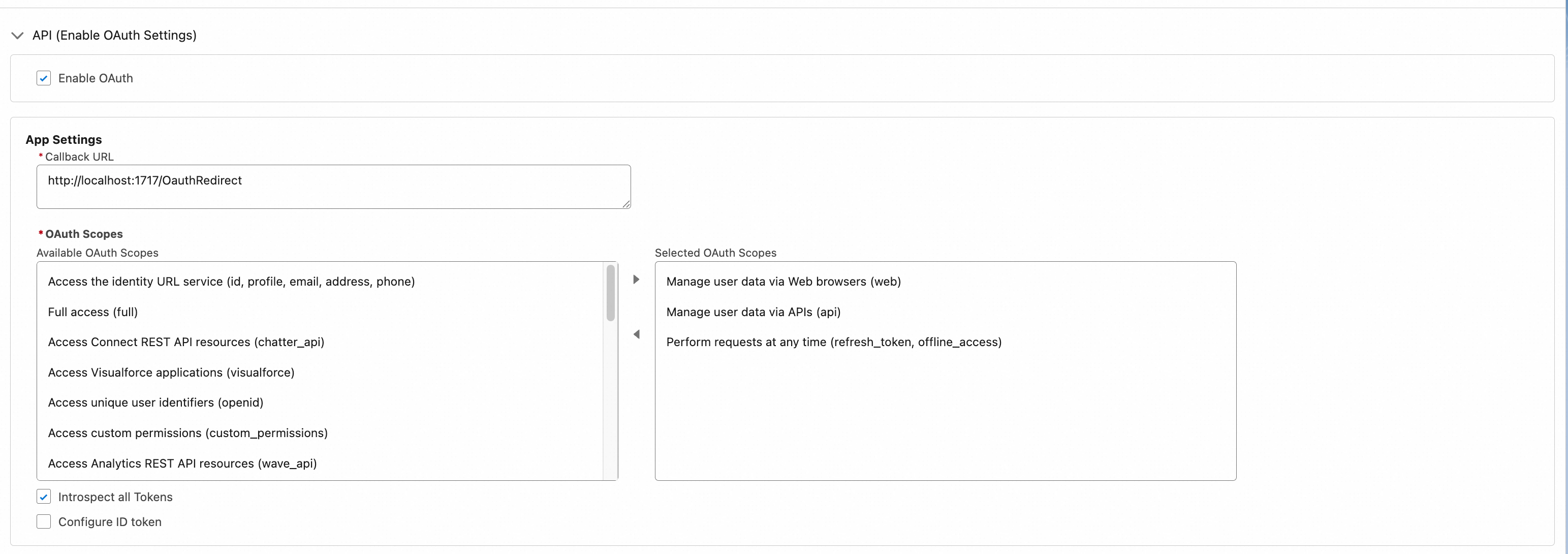
- Check Enable OAuth Settings
- Set Callback URL to
http://localhost:1717/OauthRedirect - Add these three OAuth Scopes:
Manage user data via APIs (api)Manage user data via Web browsers (web)Perform requests at any time (refresh_token, offline_access)
The OAuth settings panel after configuration. The left side lists available scopes, the right side shows the three selected ones, and the Callback URL is set to http://localhost:1717/OauthRedirect:
- Do not check Require Proof Key for Code Exchange (PKCE) Extension—PKCE must be disabled on SFoA, or CLI authorization will fail
- Save
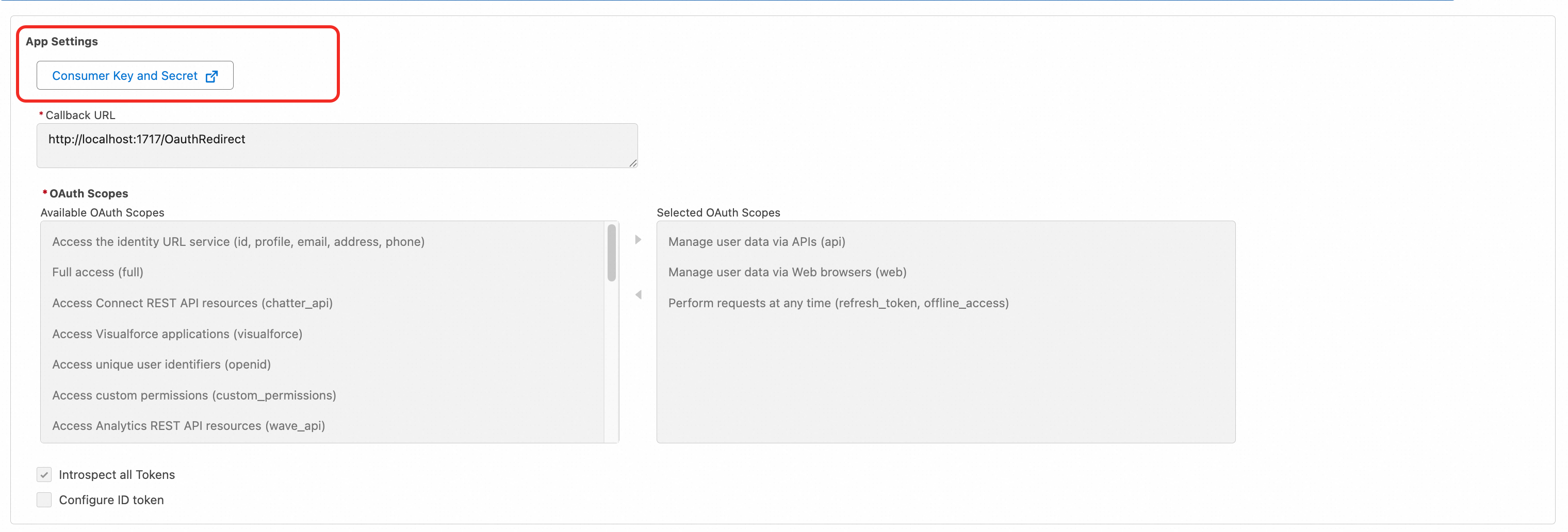
In the Security section, the PKCE option (highlighted in the red box) must remain unchecked. If accidentally enabled, CLI authorization will fail with invalid_grant:

After saving, navigate to the app's Settings tab. At the top of the OAuth Settings section, there is a Consumer Key and Secret link (red box). Click it and copy the Consumer Key—you will need it for authorization:
Step 2: Set environment variables (required on Mac / Linux)
On Mac and Linux, Salesforce CLI performs a DNS check during the OAuth callback. SFoA domains can trigger this check to fail under certain network conditions, causing the authorization flow to hang or throw errors. The fix is setting two environment variables:
# Mac / Linux: add to ~/.zshrc or ~/.bash_profile
export SF_DISABLE_DNS_CHECK=true
export SF_DOMAIN_RETRY=0
Restart your terminal or run source ~/.zshrc to apply.
Windows users should also set these, though the issue is less common:
# Windows PowerShell
$env:SF_DISABLE_DNS_CHECK = "true"
$env:SF_DOMAIN_RETRY = "0"

# Or set permanently via System Environment Variables
SF_DISABLE_DNS_CHECK=true skips the CLI's DNS pre-check on the org domain. SF_DOMAIN_RETRY=0 prevents the CLI from repeatedly retrying failed domain resolution (the default retries many times with long waits between each). These variables only affect CLI connection behavior, not security.
Step 3: Authorize the org via terminal
Open VS Code and run the following command in the integrated terminal. Replace YOUR_CONSUMER_KEY with the Consumer Key from Step 1:
sf org login web \
  --instance-url https://login.sfcrmproducts.cn \
  --client-id YOUR_CONSUMER_KEY \
  --set-default \
  --alias sfoa-dev
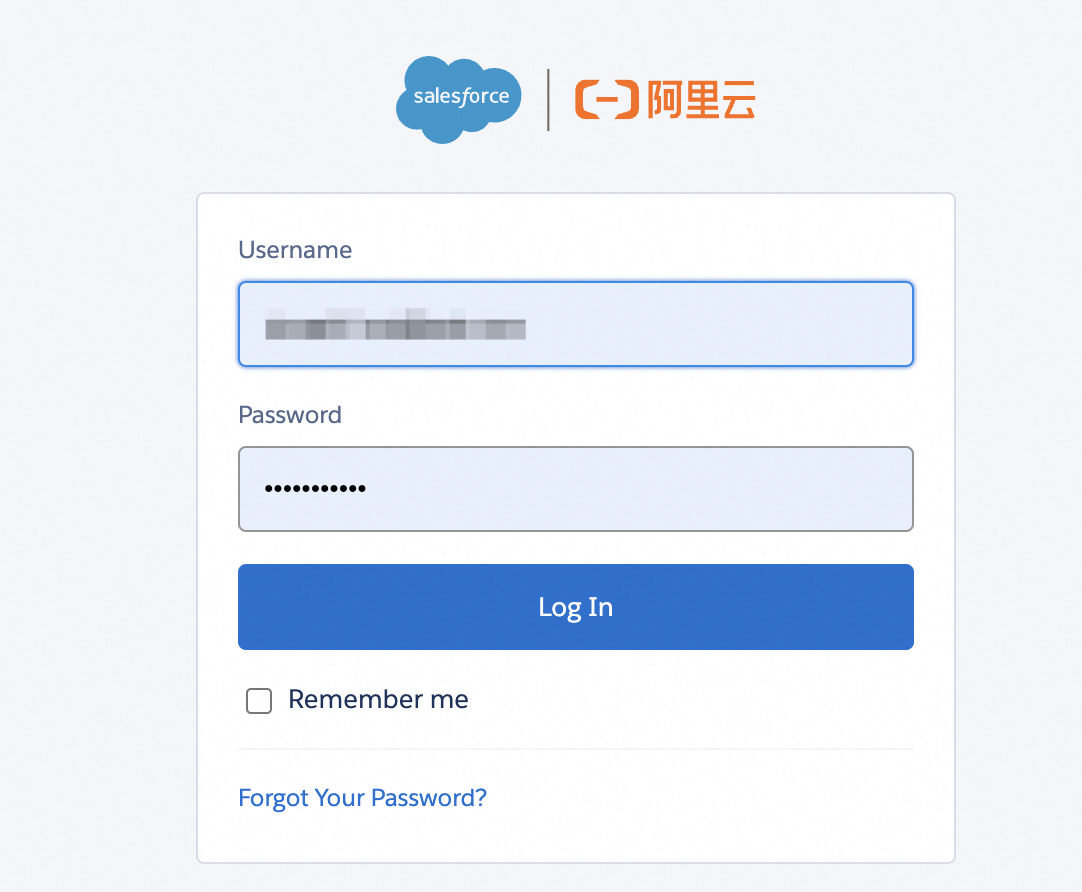
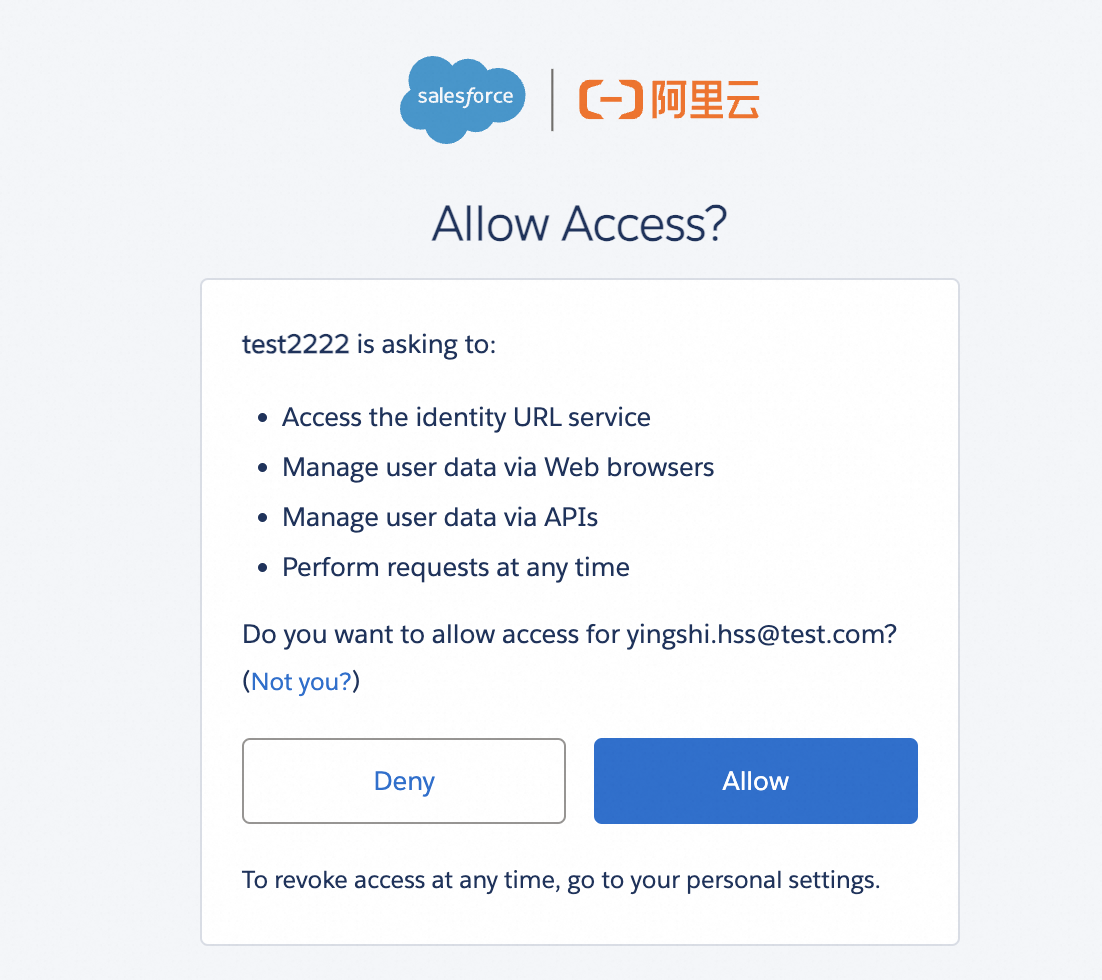
A browser window will open to the SFoA login page (left). Enter your username and password. After login, you will see the permission confirmation page (right)—click Allow. Return to VS Code and the terminal will show a success message.
If you use My Domain, change --instance-url to your My Domain address, such as https://your-company.my.sfcrmproducts.cn.
Verify the connection:
# List authorized orgs
sf org list

# Display current org details
sf org display --target-org sfoa-dev
Why doesn't the Command Palette work? When you use SFDX: Authorize an Org in VS Code—regardless of whether you select Production, Sandbox, or Custom—the underlying sf org login web call never passes a --client-id parameter. It uses the global built-in client_id hardcoded in the extension. SFoA's authentication server does not recognize that id, so it always returns invalid_client_id. There is currently no configuration option to override this default client_id.
Day-to-day operations after authorization
Once connected, pushing and pulling code works exactly like the global version:
# Deploy code to the org
sf project deploy start --target-org sfoa-dev

# Retrieve metadata from the org
sf project retrieve start --target-org sfoa-dev

# Deploy a specific directory
sf project deploy start --source-dir force-app --target-org sfoa-dev

# Run Apex tests
sf apex run test --target-org sfoa-dev --result-format human
Right-clicking files in VS Code and selecting Deploy This Source to Org or Retrieve This Source from Org also works normally. Apart from the authorization step which must go through the terminal, all other SFDX: Command Palette commands work as expected.
Common issues
| Symptom | Cause | Fix |
|---|---|---|
| Browser opens but page does not load | Network not allowing sfcrmproducts.cn |
Ask IT to allowlist *.sfcrmproducts.cn and *.sfcrmapps.cn |
| Authorization flow hangs indefinitely | DNS check timeout on Mac | Set SF_DISABLE_DNS_CHECK=true and SF_DOMAIN_RETRY=0 |
Error: invalid_client_id |
Used Command Palette default authorization (built-in client_id is for global Salesforce), or Consumer Key copied incorrectly | Must use terminal command sf org login web --client-id. Verify Consumer Key was copied from the External Client App's Settings page |
Error: PKCE error or invalid_grant |
PKCE is enabled in External Client App | Disable the Require PKCE Extension option |
Authorization succeeds but sf org list shows nothing |
VS Code and terminal use different CLI instances | Run commands in VS Code's integrated terminal, not an external one |
Deploy fails with INVALID_SESSION_ID |
Token has expired | Re-authorize with sf org login web |
Additional considerations for SFoA development
- API version: SFoA's release cadence does not perfectly match the global version—it can lag by one to two months. Set
sourceApiVersionbased on what your SFoA org actually supports, not the latest global version number - Pub/Sub API unavailable: if your project depends on Change Data Capture event streams, you need an alternative approach on SFoA
- Platform Functions unavailable: only traditional Apex and Flow are supported
- Einstein AI restricted: code referencing Einstein APIs will fail when deployed to SFoA. AI capabilities go through CXG AI Connector + Alibaba Cloud Bailian
- Data compliance: do not casually sync data between a global org and an SFoA org. Cross-border data transfer from China requires regulatory approval